09Case study / Product
Nomie
A classroom game redesigned to help students and teachers connect: led from research to delivery, and launched live on Nomie’s platform.

Introduction
“Guess the Answer,” redesigned to help students and teachers connect.
Nomie, a social bonding game company, approached our team of designers to improve the experience and interface of its classroom game, “Guess the Answer.” The goal: an engaging, intuitive interface that resonates with players and fosters meaningful connections.
I led the team as team lead and lead designer, and was Nomie’s primary point of contact, from the audits and research to the high-fidelity design and the brief for Nomie’s developers.
The redesign was delivered and launched live on Nomie’s platform.
- 3
- Kinds of audit: heuristic evaluation, game audit, and accessibility report
- 8
- Usability testers: 4 students and 4 teachers
- 10
- Refinements after testing: 4 for teachers, 6 for students
My Role
My role, across the team and the redesign:
- Team leadNomie’s primary point of contact: decision-making, organisation, and one team voice.
- Lead designerThe interface, from sketches and wireframes to high-fidelity screens.
- UX researchHeuristic evaluations, game audits, accessibility reports, personas, and usability tests.
- Game UXProgress bars, timers, and celebrations that encourage participation.
- AccessibilityContrast to WCAG 2.0, and a form of Bionic reading.
- UX writingClearer instructions, labels, and status lines.
- Developer briefOur team’s brief for Nomie’s developers, interaction by interaction.
The Challenge
- Problem
- “Guess the Answer” wasn’t engaging enough to build social bonds among students and teachers, which held back its impact on the classroom.
- Solution
- Immersive game mechanics, an intuitive interface, and better accessibility, to foster social bonding and engagement.
The interface lacked clarity, consistency, and responsiveness, which made it hard for players to move through the game smoothly and fully enjoy it.
Design Process
Six steps, each one building on the last:
- 01
Research
Heuristic evaluations, game audits, and accessibility reports, built on the former team’s research.
- 02
Ideate
Personas and How Might We statements.
- 03
Sketch + wireframe
Iterative refinement, from sketches to wireframes.
- 04
Accessibility
Contrast to WCAG 2.0, and Bionic reading built in.
- 05
High fidelity
Polished visuals and refined interactions.
- 06
Test + refine
Usability tests, then the final adjustments.
Research + Audits
We started from the former team’s competitive and primary research, then audited “Guess the Answer” three ways:
Heuristic evaluation
- System status
- User control
- Help
Too little feedback at critical moments, like forming groups and submitting questions; no way to edit a question or answer; and too little help to finish tasks.
Game audit
- Social features
- Randomness
- Host control
No reactions like emojis, no input or output randomness, and hosts couldn’t see the questions players submitted.
Accessibility report
- WCAG 2.0 AA
A mix of passes and fails. Adaptable content, a meaningful reading sequence, and resizable text passed; contrast ratios, time adjustment, and error handling fell short.
User Personas
From primary and secondary research, we built a persona for each side of the classroom: a student and a teacher. They kept our decisions grounded in real behaviours and motivations.

“I want to discover the connections between people of the past, present, and future.”
- Age
- 18
- Role
- CEGEP Student
- Education
- Cégep de Sainte-Foy
- Location
- Quebec, Canada
Student persona
Baptiste
Baptiste is currently a first-year student at cégep majoring in literature. He enjoys ample quiet time reading by himself and leaves minimal time for social engagements. However, he does look forward to meeting new people within his cégep classes who share his passion for the beauty of liberal arts.
Pain points
- Cégep is a place where everybody is new to everybody, so meeting new people becomes more challenging.
- Baptiste’s heavy time investment into reading hinders his social life.
- As an introvert, it is difficult for Baptiste to make friends outside of school.
Goals
- Wants to connect with colleagues who are also passionate about books and have meaningful discussions with them.
- Use his time at cégep more efficiently to expand his social circle.
Personality
- IntrovertExtrovert
- AnalyticalCreative
- PassiveActive
- MessyOrganised
- IndependentTeam player

“I believe in the power of combining the proven methods of traditional teaching with the innovations that technology brings.”
- Age
- 32
- Role
- CEGEP Professor
- Education
- University of Montreal
- Location
- Quebec, Canada
Teacher persona
Camille
Camille is a new professor at Cégep de Sainte-Foy who wants to bring a fresh perspective to the curriculum. There are many opportunities to better the antiquated education system by incorporating technology and bringing academics up to speed with the world today. Her intentions are to make her class a safe space where students can grow alongside their peers.
Pain points
- Students do not interact with one another in Camille’s class because they all came from different schools prior.
- Student enrichment is a big concern for Camille because she recognises that it is important for academic success.
Goals
- Wants to get to know her students’ personalities and remember them by name.
- Encourage her students to engage in intellectual discussions and social collaborations.
Personality
- IntrovertExtrovert
- AnalyticalCreative
- PassiveActive
- MessyOrganised
- IndependentTeam player
How Might We
We framed the research as three questions, each one an actionable prompt for ideas:
01Students
How might we
encourage students to be excited and interested in forming meaningful connections with their peers, through the gaming platform?
02Students + teachers
How might we
enhance social engagement and participation among students and teachers, for a more interactive and collaborative environment?
03Teachers + students
How might we
amplify teacher interaction and strengthen the bonds between teachers and students, for a more interconnected, engaging experience for both?
User Flows
Two flows, one for each side of the classroom. Students move from onboarding to gameplay, while teachers get extra tools to manage settings and follow progress.

Game UX
Emotional engagement and social interaction were at the heart of the redesign. Game mechanics give players feedback, encourage participation, and make the experience rewarding:
Progress bars
Group and class progress, at a glance.
Timers
A visible readiness timer, counting down to play.
Celebrations
“You’re a Star... Fish!” when a guess is right.
Group play
Small groups, and a turn for each student.

From Sketch to Screen

Sketches first
Sketches laid out the wireframes, and gave the design a visual roadmap.
Wireframes were pivotal: they let us refine the interface for clarity and usability.

Joining a game

An inappropriate question
Then, quick guerrilla tests:
- Mixed reactions
- Some found the game easy and enjoyable for classrooms.
- Confusion
- Over game titles, and unclear instructions.
- Frustration
- With touch delays and after-delays.
- Suggestions
- Clearer screens, and clearer guidance.
High fidelity brought the wireframes to life, with polished visuals and refined interactions.


Wireframe: Greyscale Create Your Question wireframe: the Nomie fish mascot says 'Remember, keep your question and its answer secret!' above empty question and answer fields and a Submit button. Design: High-fidelity Create a Question screen in white and mint green: the fish mascot says 'Time to create your own question!' above filled question and answer fields, a Submit button and Go Back.


Classroom Queue

Choose a Question
Accessibility
Accessibility was a key focus. We raised contrast to meet WCAG 2.0 guidelines, and built in a form of Bionic reading, which subtly helps players with ADHD, ADD, and dyslexia read faster, focus better, and retain more. It invites active engagement with the text, for a more inclusive experience.
Guess the Answer
4.52 to 1
White on Nomie’s deep orange
Passes AA
#FFFFFF on #C45506
Guess the Answer
5.57 to 1
Dark teal on Nomie’s green
Passes AA
#0B3742 on #43BF95
Usability Testing
Four students and four teachers tested the game. Their feedback confirmed the need for clearer navigation cues, clearer instructions, and stronger visuals.
What teachers found
- Task clarity
- Progress bars
- The game’s purpose
- Button labels
- When to start
Teachers needed clearer tasks, easier progress bars, the game’s purpose explained, simpler labels, and the freedom to start when ready.
What students found
- Onboarding
- Reward terms
- Navigation
- Answer wording
- Group instructions
- Text colour
Students needed clearer onboarding and reward terms, smoother navigation, plainer wording for confirming answers, better instructions for forming groups, and more visible text colour.
Final Design Adjustments
Testing shaped the final adjustments, screen by screen:
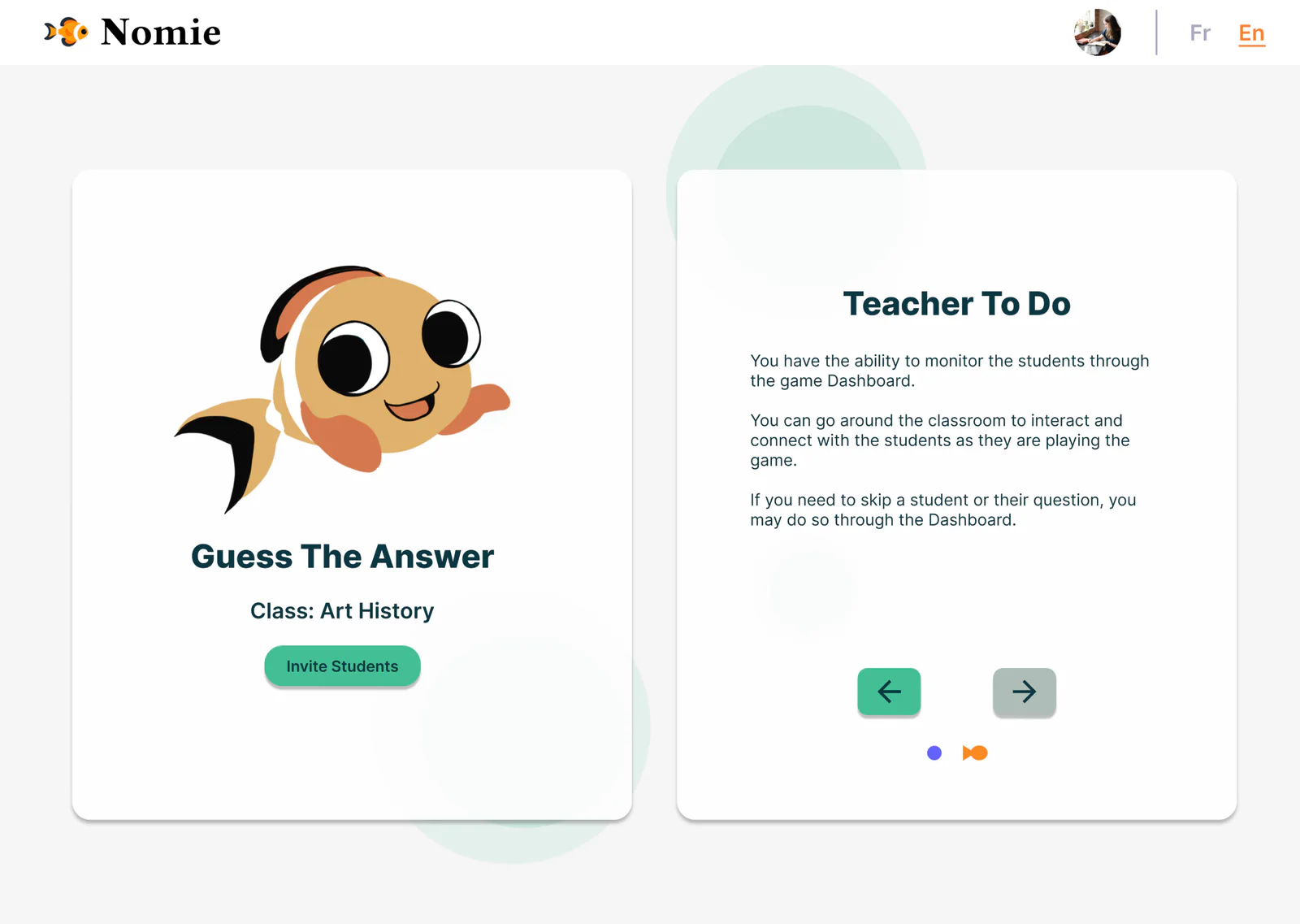
Before testingWhat we found
- The game’s purpose
Teachers struggled to grasp the game’s purpose in the introductory screens.
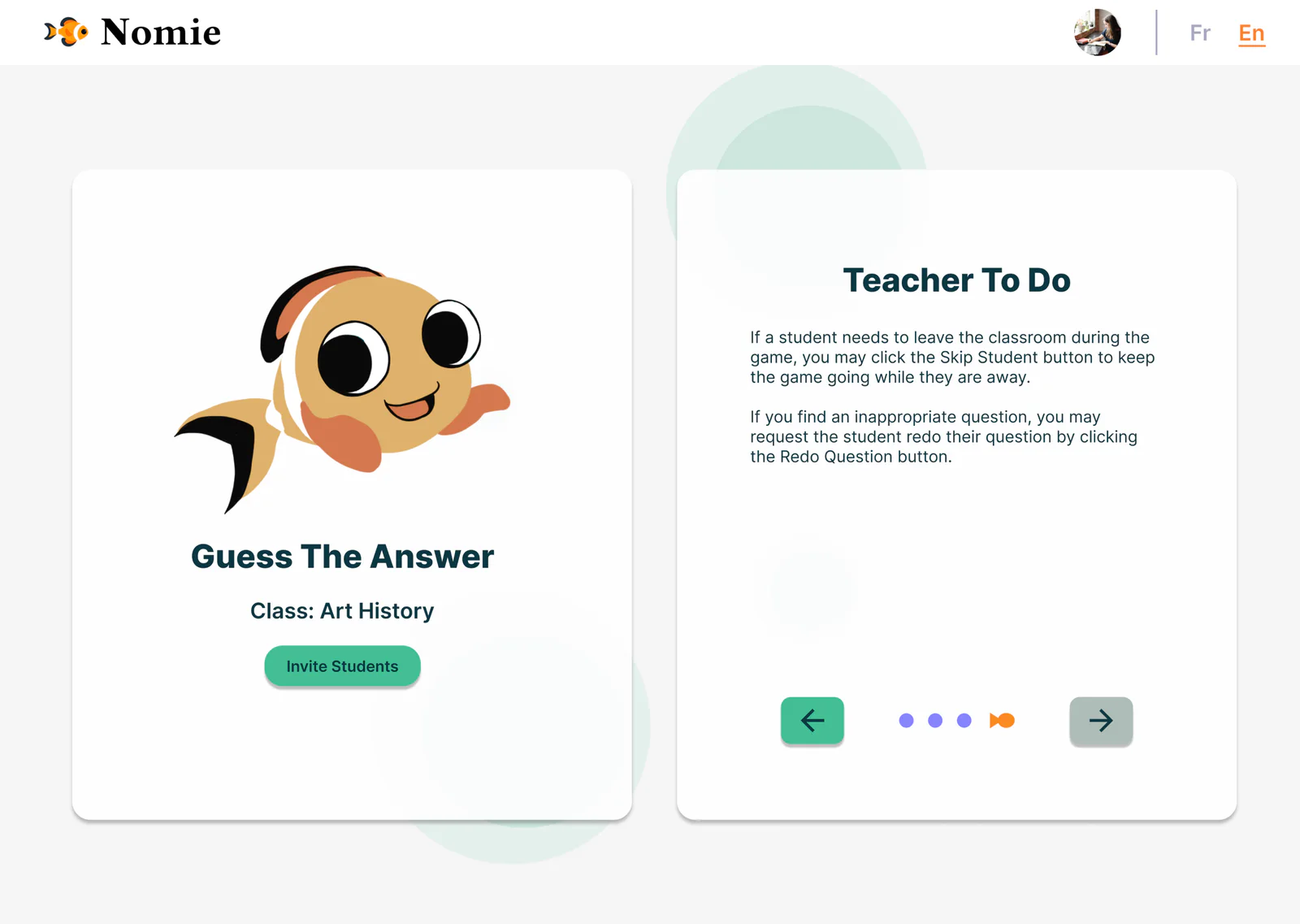
After testingWhat changed
- More pages
- Skip and redo, explained
Added pages help teachers understand the game’s purpose and what students are doing, and the skip and redo buttons are now fully explained.


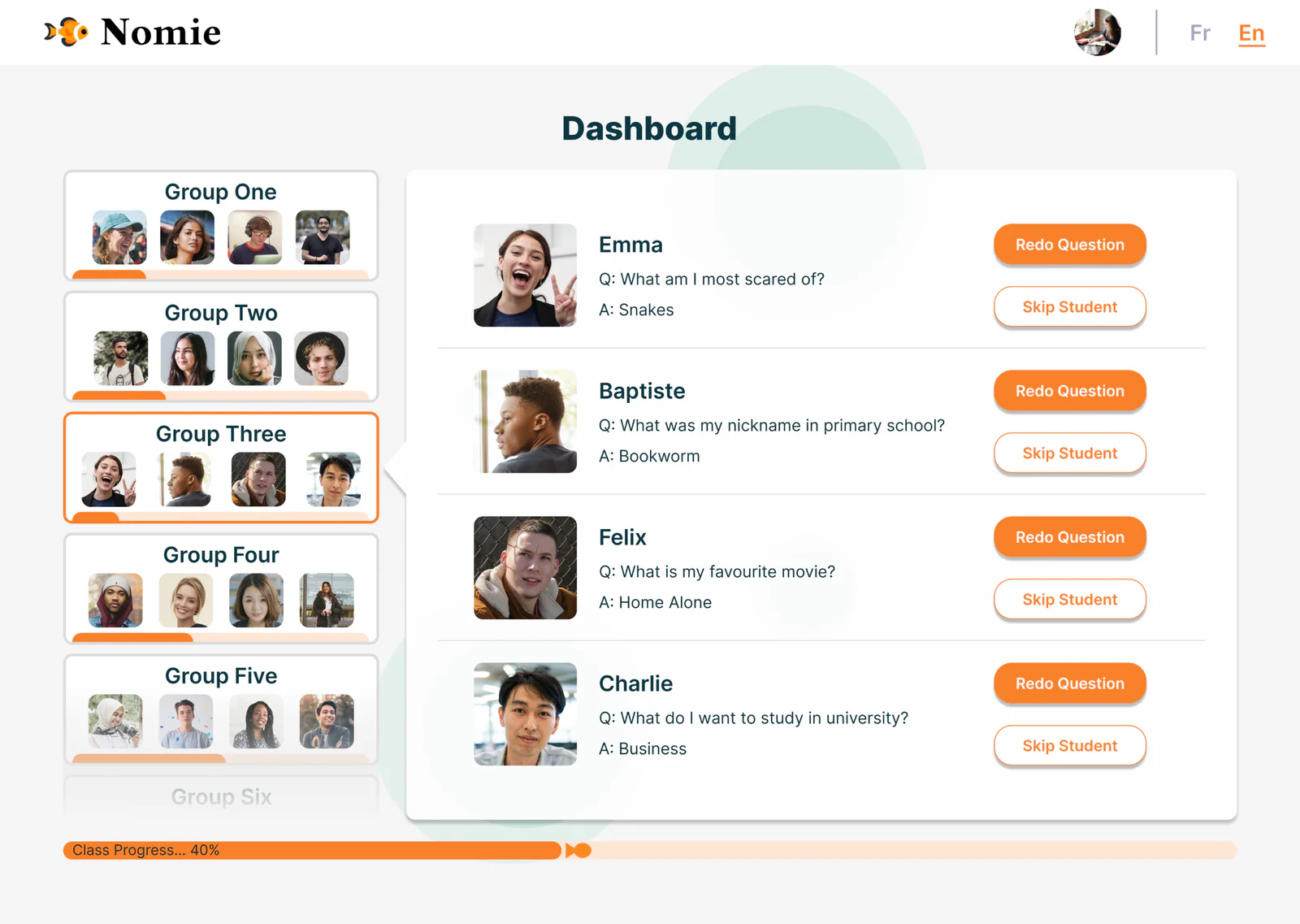
Before testingWhat we found
- Groups as tabs
Group organisation read as tabs, not boxes.
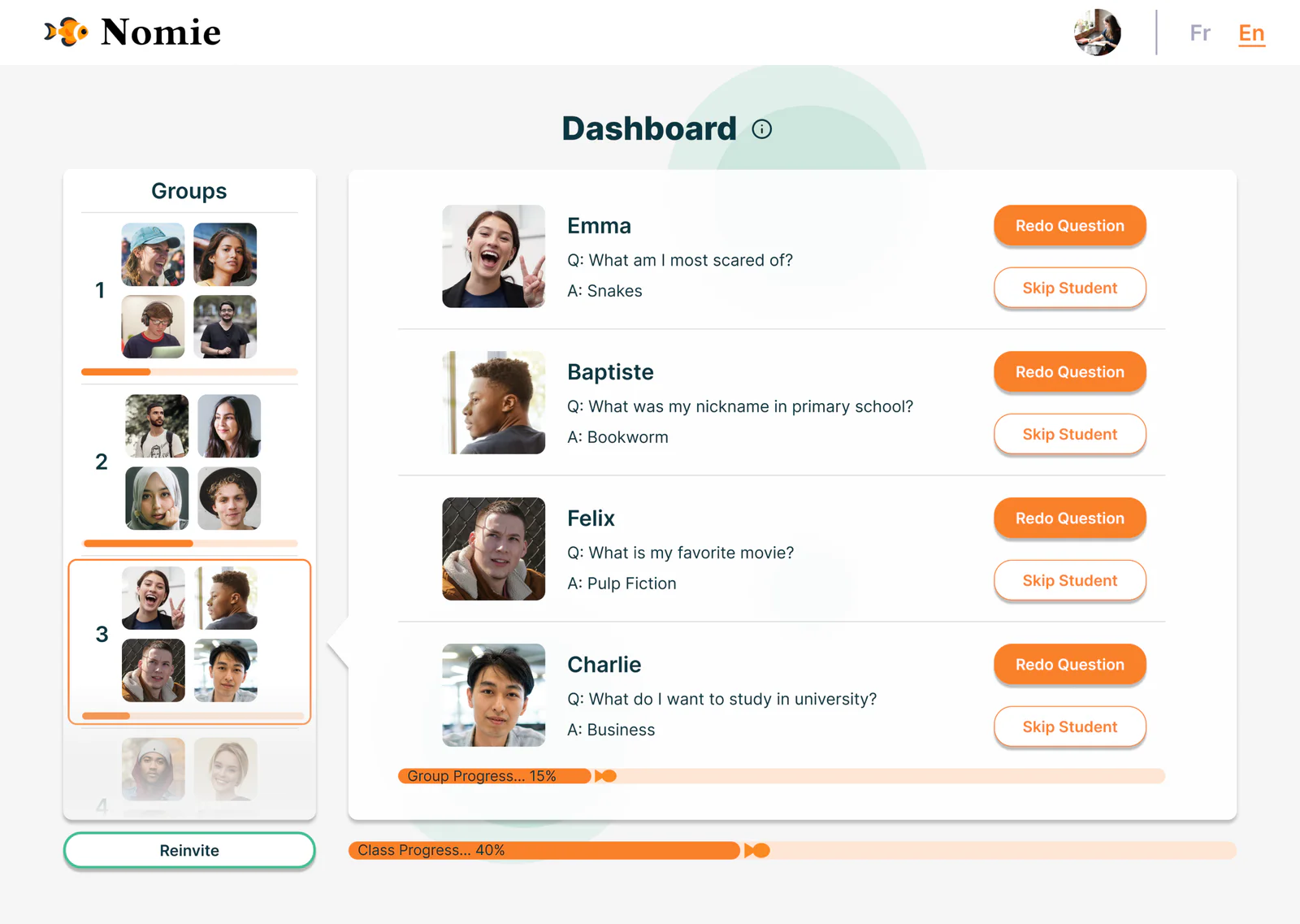
After testingWhat changed
- Numbered groups
- Reinvite
- Progress in percent
Groups are organised as numbered boxes, a Reinvite button re-engages disconnected or absent students, and the group’s progress bar shows a percentage.


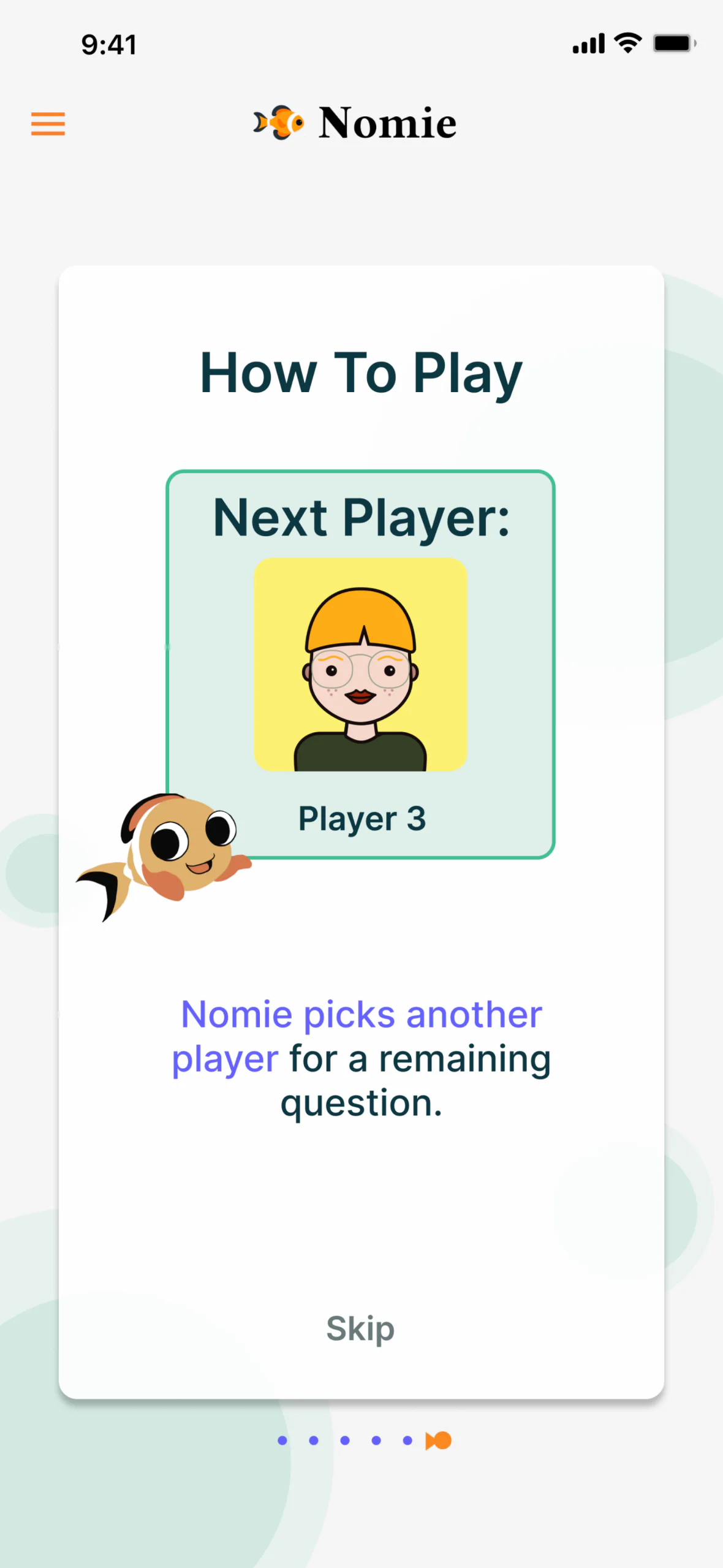
Before testingWhat we found
- Graphic too youthful
- Text colour
The learning graphic looked too youthful, and the text colour for bionic reading was subpar.
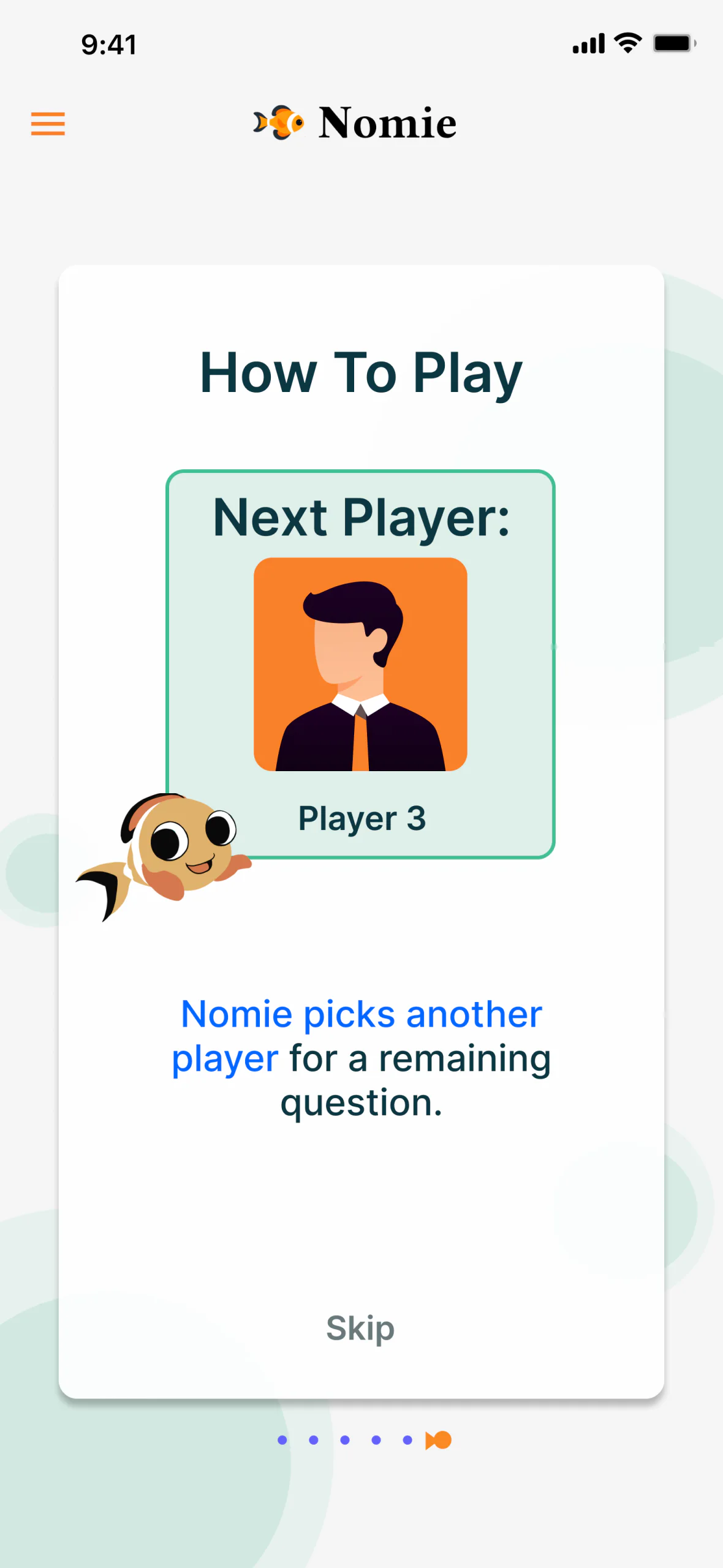
After testingWhat changed
- A more mature graphic
- Colour for bionic reading
An updated graphic for maturity, and a text colour adjusted for optimal bionic reading.


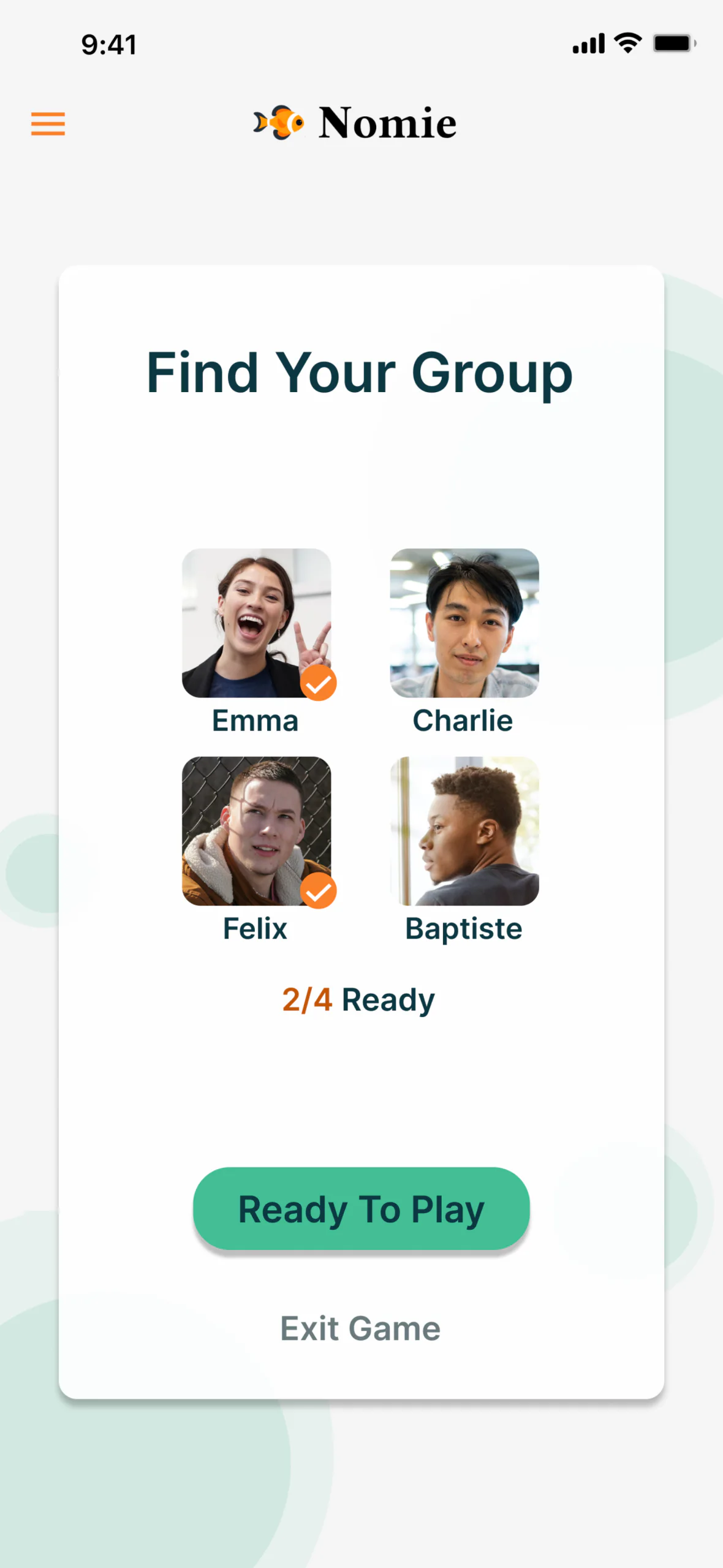
Before testingWhat we found
- Only the title
- Ready right away
Only the title told students to find their group, and they might tap Ready To Play before meeting it.
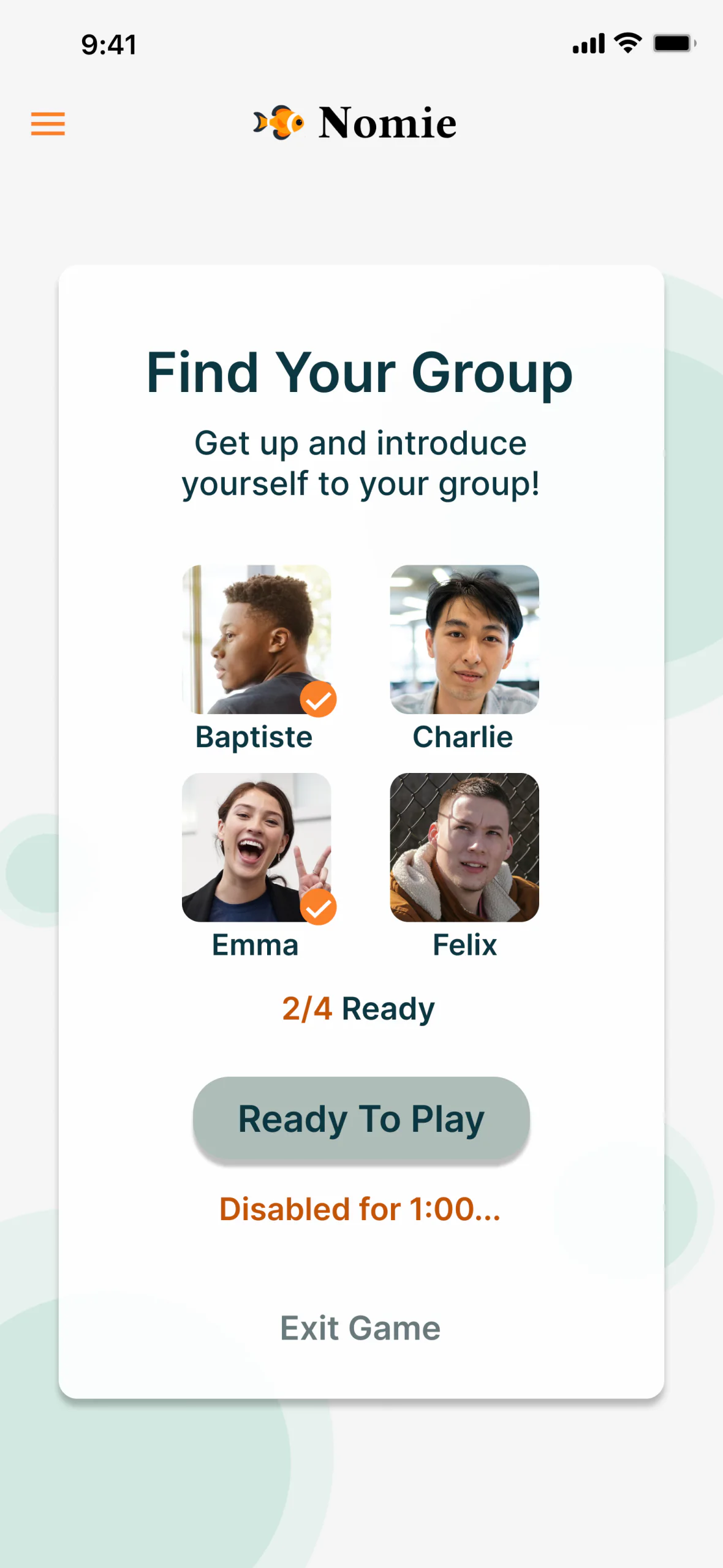
After testingWhat changed
- Body text
- Disabled at first
- Countdown
Body text tells students to find their group, and Ready To Play stays inactive until a countdown runs out.


And in the words:
Who you’re waiting on
Beforeis checking the answerAfterFelix is confirming the answer
Redundant text
BeforeFelix is answering question.AfterRemoved
The name is the point. It’s a real-life game, played in groups of friends, so the status line tells everyone exactly who they’re waiting on.
Plus four more changes from testing:
- Start when ready
- Teachers can start a game at their convenience.
- Alphabetised
- The queue-up and status screens are in alphabetical order.
- Meet the game master
- A new screen before rule 1 introduces Nomie as the game master.
- Skip the rules?
- A screen confirms that a student wants to skip the rules.
Delivery
We briefed Nomie’s development team on the essential features and interactions on the student side, so the design would carry seamlessly into the game:
The brief
- Swipe gestures
- A visible readiness timer
- Clickable questions
- Celebratory animations
- A redo question option
- Skip rules confirmation
The student side of the game, interaction by interaction.
The redesign received positive feedback from users and from Nomie’s team, for its usability, engagement, and overall appeal. Usability tests confirmed clearer navigation, better visuals, and greater satisfaction with the whole experience.
Delivered, and launched live on Nomie’s platform.
Learnings
- 01
Design for the room, not just the screen. It’s a real-life game, played in groups of friends, so the status line names the player everyone is waiting on.
- 02
Design the behaviour you want. A countdown on Ready To Play gives students time to meet their group.
- 03
Test accessibility too. Students found the bionic reading colour hard to see, so we tried a light blue in place of purple.
- 04
Lead with one voice. As Nomie’s primary point of contact, I kept the team speaking with one voice.
Conclusion
As team lead, I facilitated decision-making and organisation, served as Nomie’s primary point of contact, and kept the team speaking with one voice throughout the project.
Our collaboration with Nomie shows the power of user-centred design: a game that delights and engages players, built for Nomie’s mission of fostering social bonding through interactive play.
Rebecca has been an invaluable leader and UX/UI expert for our team at Nomie. Her vision and guidance helped shape our app, making it more intuitive and user-friendly.